
REAL-WORLD PHOTO PREPARATION
Start with an ordinary photo
Use a photo from your phone, prepare the background and framing, choose the required document size and review the result before submission.
Open Photo Studio →
 USA
USA
 Canada
 UK
UK
 India
India
 Australia
 Germany
 France
 Italy
Italy
 UAE
UAE
 Singapore
 Japan
Japan
 China
China
 New Zealand
 Ireland
 Schengen
 Brazil
 South Africa
 Malaysia
 Thailand
 Saudi Arabia
 Philippines
 Indonesia
 Mexico
 Türkiye
 Switzerland
Create a passport size photo online or prepare a visa or ID photo using country-specific photo sizes, digital requirements, background rules and print-ready photo sheets. Start with a photo you already have or take a new one yourself.
Background, lighting and framing tools.
Country and route-aware profiles where available.
300 DPI sheets and PDF/PNG export.

POPULAR DOCUMENTS
Explore popular verified document requirements before you open the existing Studio. This public layer is designed to answer the research question and bring qualified visitors into the paid workflow.
INDIA · Passport
Passport requirement for India
Check requirement →US · Passport
Passport requirement for United States
Check requirement →GB · Passport
Passport requirement for United Kingdom
Check requirement →CA · Passport
Passport requirement for Canada
Check requirement →FR · Passport
Passport requirement for France
Check requirement →JP · Passport
Passport requirement for Japan
Check requirement →AU · Passport
Passport requirement for Australia
Check requirement →NZ · Passport
Passport requirement for New Zealand
Check requirement →POPULAR PASSPORT PHOTO SIZES
Find common passport photo sizes such as 2×2 inches (51×51 mm), 35×45 mm and 50×70 mm, then open the exact country and document requirement before creating the final photo.
PASSPORT PHOTO REQUIREMENTS, SIZES & PRINTING
Find passport photo requirements, visa photo sizes, ID photo rules, 2×2 photos, 35×45 mm photos, digital upload limits and print-ready photo sheets before you create the final image.
REAL-WORLD PHOTO PREPARATION
Use a photo from your phone, prepare the background and framing, choose the required document size and review the result before submission.
Open Photo Studio →
BEFORE & AFTER
Compare the source portrait with the prepared document-photo presentation.
HOW IT WORKS
Every step is designed around a real photo workflow instead of abstract graphics.

Use a photo you already have, or take a new one yourself with your phone or camera.

Adjust the background, framing, dimensions and document profile in Studio.
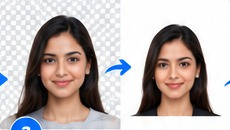
Check background, dimensions, face position and lighting.
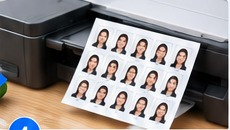
Create an individual photo or arrange a print-ready sheet.
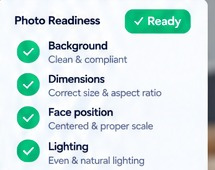
PHOTO READINESS
Fast ID Photo gives you visual preparation tools so you can inspect the result yourself. Requirements can differ by authority, so always check the latest official instructions.
BEFORE YOU CREATE
FastIDPhoto now gives visitors a public research and checking layer around the existing Studio workflow. Find the country requirement, check a source photo, understand common rejection risks and then move into the paid creation workflow.
01
Country, document, size, digital rules, source and verification date.
Find a requirement →02
Choose country and document to see the verified physical size.
Find photo size →03
Check measurable file and photo signals in your browser before creation.
Check my photo →04
Understand size, background, framing, quality and upload mistakes.
See rejection guide →COMPLETE PHOTO TOOLKIT
Real photo preparation tools, documented dimensions and print output in one workflow.
Remove the original background and prepare a clean document-photo background.
Fine-tune brightness and contrast manually while reviewing the original photo.
Select passport, visa or ID requirements and use documented dimensions where available.
Create photos for any custom width and height when an authority requires a non-standard size.
Position the subject precisely and make manual corrections before export.
Use visual framing guidance to help position the face consistently.
Choose white, off-white, light blue or any custom HEX background color.
Arrange multiple photos on A4, 4×6, 5×7 or Letter layouts with spacing and margins.
Generate high-resolution print sheets designed around physical print dimensions.
Download individual photos and print-ready sheets in convenient formats.
The final decision remains with you and the relevant authority — review every result before use.
PLANS & PRICING
Fast ID Photo serves customers worldwide. Plan prices are presented equally in INR and USD; checkout currency is selected for the customer and payment method.
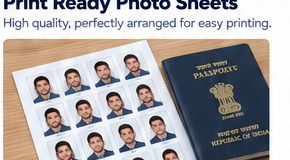
REAL PEOPLE • REAL PHOTO WORKFLOW
See realistic examples of customers using Fast ID Photo for everyday document-photo needs.




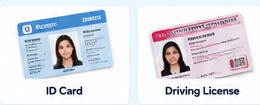
DOCUMENT TYPES
Country-specific passport profiles where documented.
Route-aware visa selection where supported.
Custom dimensions make non-standard ID sizes possible.
Prepare images for other document workflows using the appropriate specification.
For account-specific assistance, open the Support Desk after signing in. Sales enquiries can be sent to sales@fastidphoto.com.
Open Support Desk
Fast ID Photo provides preparation tools and guidance; it does not guarantee that a processed image will be accepted by an authority. Always check the latest official requirement before submitting.
POPULAR PHOTO WORKFLOWS
Start with the document, size or print workflow that matches your application.
Create a passport photo online →
Prepare an India passport photo →
Prepare a 35 × 45 mm photo →
Prepare country-specific visa photos →
Create standard or custom ID photos →
Prepare a square US visa photo →
Create a passport photo print sheet →
Arrange photos on A4 →
PASSPORT PHOTO FAQ
Get quick answers before you create a photo, then open the detailed requirement or free tool for your exact country and document.
Passport photo size depends on the country, document and application route. Common formats include 35×45 mm and 2×2 inches, but FastIDPhoto shows the verified rule for the selected requirement.
Yes. FastIDPhoto helps you check the requirement, prepare the photo in Studio and create a digital or print-ready output for the selected document.
A 2×2 inch photo is 51×51 mm. It is used for several document workflows, but the complete rules can still differ by document and application route.
35×45 mm is a common document-photo format used by many countries and applications. The exact background, face framing and digital rules still need to be checked for the specific document.
Yes. FastIDPhoto Studio includes print-sheet workflows for A4 and other supported paper sizes, with physical photo dimensions set by the selected requirement.
Use Requirement Match to select the exact context, then run Photo Compliance Test or Photo Quality Analyzer before creating the final output.